Getting Started
Get your robot connected to The Platform in a few minutes. We support ROS2 and VIAM robots with one-line installers.
No robot yet? Try it in the browser
You don't need any hardware to see what The Platform does. Create an account, open the fleet page, and start a simulated robot — a virtual care-home wing with a LiDAR robot in it. Drive it around, build a live SLAM map, drop named waypoints, and run a multi-stop route that auto-docks to charge between runs. It's the real Platform — only the robot is simulated.
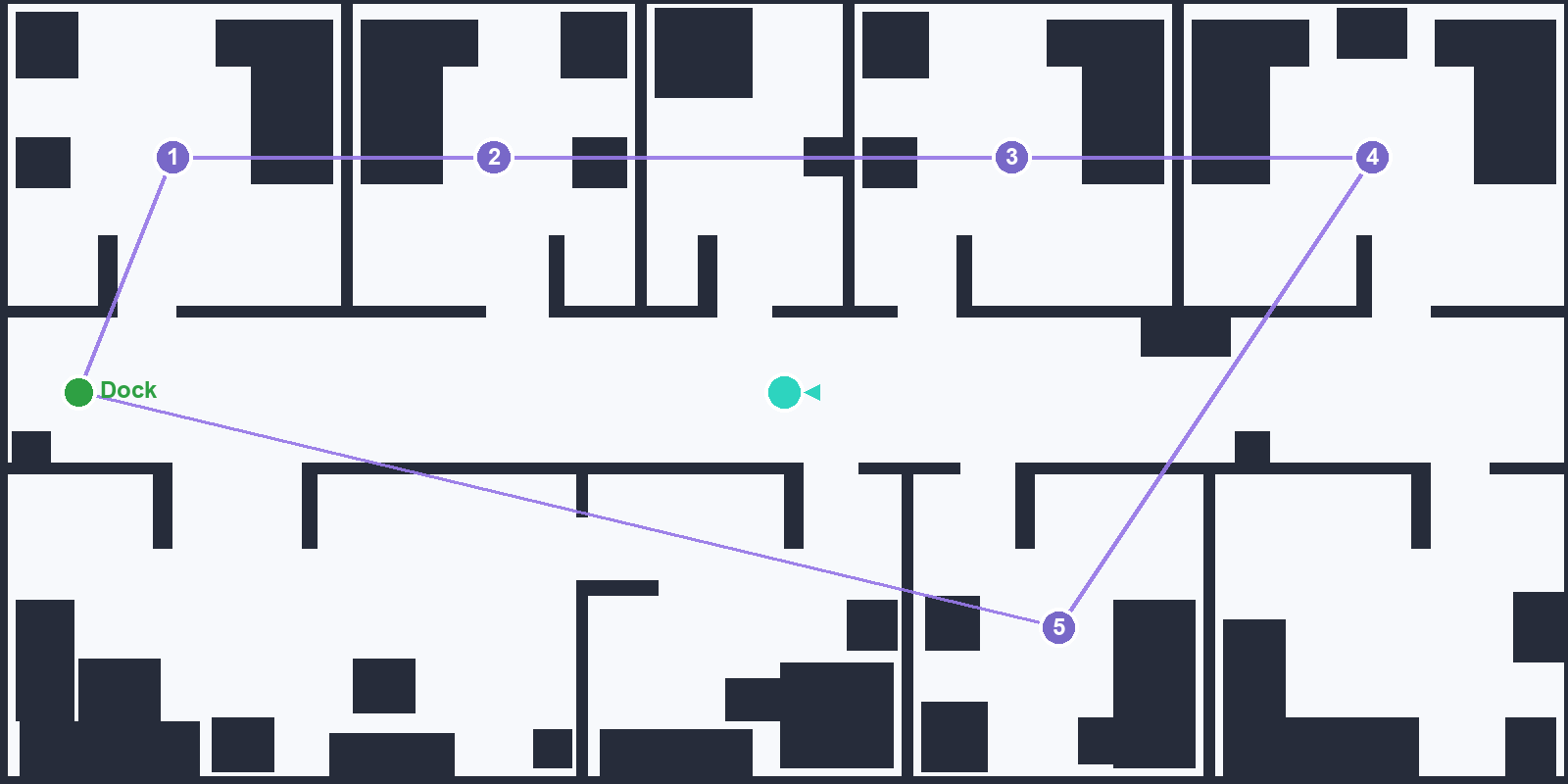
The sim's care-home wing with a five-stop patrol route and a charging dock — mapped and driven entirely in the browser, no robot required.
Install the Driver
Pick the installer for your robot platform and run it on your robot:
ROS2 Robots
For robots running ROS2 Humble, Iron, or newer:
VIAM Robots
For robots managed via the VIAM platform:
Both installers walk you through everything interactively:
See Your Robot in the Dashboard
Open your dashboard - your robot will appear as soon as the driver connects. Click on it to get live video, joystick control, and sensor monitoring.
If your robot has a LiDAR, it can also drive itself: build a SLAM map, drop named waypoints, and run multi-stop routes - the driver handles obstacle avoidance (LiDAR and bumper) and can return to its dock to charge, all from the same map view.
Reference: ROS2 Topics
The driver bridges these standard ROS2 topics to the platform:
| Direction | Default Topic | Message Type | Description |
|---|---|---|---|
| Subscribes | /camera/image_raw |
sensor_msgs/Image | Camera feed (streamed via WebRTC) |
| Subscribes | /odom |
nav_msgs/Odometry | Wheel odometry |
| Subscribes | /imu/data |
sensor_msgs/Imu | IMU orientation and acceleration |
| Subscribes | /scan |
sensor_msgs/LaserScan | LiDAR data (downsampled) |
| Publishes | /cmd_vel |
geometry_msgs/Twist | Movement commands from the web UI |
| Publishes | /map |
nav_msgs/OccupancyGrid | SLAM map the driver builds from /scan (auto) |
/scan (LiDAR) and it runs slam_toolbox itself, publishing
/map and driving the robot to waypoints/routes. You don't provide a map topic;
the driver produces one.
drive_type: ackermann.
A car steers its front wheels and cannot turn on the spot, so the control page swaps the
four-way joystick for a steering + speed control (a gamepad works too). Give it either
wheelbase_m or min_turn_radius_m and the driver will never ask for
a corner tighter than the car can physically make. Proven on an AWS DeepRacer -
details here.
server_url: "wss://platform.burf.co/ws/robot"
robot_id: "my-rover-01"
api_key: "paste-your-api-key-here"
# ROS2 topics (adjust to match your robot)
camera_topic: "/camera/image_raw"
odom_topic: "/odom"
imu_topic: "/imu/data"
cmd_vel_topic: "/cmd_vel"
scan_topic: "/scan"
# Motion model: "diff" (can turn on the spot) or "ackermann" (a car)
drive_type: "diff"
# Ackermann only - the car's wheelbase, used to work out its turning circle
wheelbase_m: 0.0
# Performance tuning
telemetry_rate: 5.0 # Hz
video_fps: 10
What's Next?
REST API - Build custom integrations using your API key with Authorization: Bearer <your-key>
AI assistant (MCP) - Drive a robot — or the sim — from Claude or any MCP client
Sanbot ELF / Afobot / iPal - Got a Sanbot ELF, QNAP Afobot, or iPal? Follow the BRemote setup guide
Other Robots - We also support Double 2, InMoov, and VIAM rovers
FAQ - Common questions about video latency, security, and custom robots